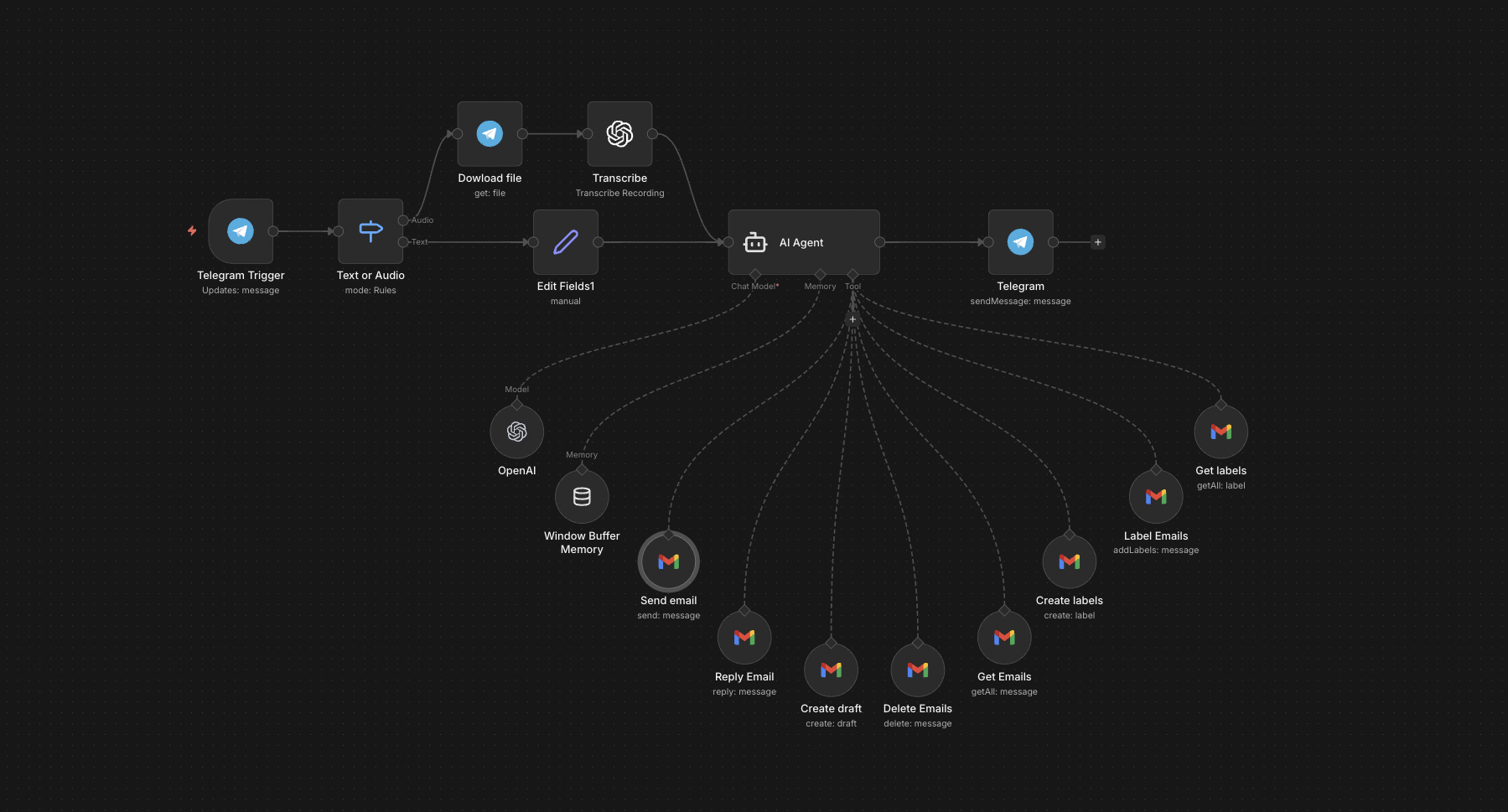
The full n8n canvas as it runs in production.
The Founder's Inbox Tax
Most founders and executives lose 90-120 minutes a day to email. Not to thoughtful replies — to the mechanical part. Open. Skim. Decide if it needs reply or archive. If reply, type three sentences. Move on. Repeat 200 times.
The mechanical part is where AI helps. Not by writing replies for you — but by letting you act on email at the speed of speech instead of the speed of typing. Voice-to-Telegram-to-Gmail compresses the loop.
Two failure modes break manual inbox management. First, mobile typing is slow and error-prone, so people batch email to desktop time and lose hours to context switching. Second, the wall of inbox is psychologically expensive — the next email always feels like work even when it's a 5-second action.
This system fixes both. Voice from Telegram. The model interprets intent and acts directly. Send, reply, archive, label, search, delete — all by speaking. Two hours a day collapses to twenty minutes. The phone becomes a complete inbox interface.
Voice In, Inbox Action Out
Built on n8n. The interface is a Telegram bot. Text or voice messages route to a parsing layer. Voice notes transcribe via Whisper. The transcribed query routes to GPT-4o-mini with a tool-use prompt — the model decides which Gmail action to take and with what parameters.
Gmail actions execute via the Gmail API: send_email, reply, search, label, archive, delete, draft. Results route back to Telegram as confirmation. End-to-end latency for most actions: under 8 seconds. Voice queries that need disambiguation prompt back to Telegram for clarification.
From Voice Note to Inbox Action
Telegram Message Lands
Voice or text from the Telegram bot triggers the n8n workflow. Voice notes route to Whisper for transcription. Text passes through directly.
Intent Parsing
GPT-4o-mini reads the query with a tool-use prompt. Determines which Gmail action to invoke (send, reply, archive, label, search, delete, draft) and with what parameters.
Action Disambiguation
If the query is ambiguous — for example 'reply to the message from Tom' when there are three Toms — the model prompts back to Telegram for clarification before acting.
Gmail API Execution
The selected action fires against the Gmail API. Email composition uses the user's voice — past sent emails inform the tone.
Confirmation Back
Telegram receives a confirmation message with the action taken and any relevant context. For sends, the recipient and first 30 words of the email confirm.
Audit Log
Every action logs to Google Sheets with timestamp, action type, and parameters. Useful for verifying autonomous decisions and tuning the prompt.
What This Bot Does That Mobile Gmail Can't
Voice-First Interface
Speak the action. Whisper transcribes. The model acts. Faster than typing on a phone keyboard.
Context-Aware Replies
When asked to reply, the model reads the original thread and drafts a reply in the user's voice. Past sent emails inform tone.
Search and Summarise
'Summarise unread emails from this week' returns a structured digest. 'Find that email from Marcus about the contract' surfaces the thread.
Disambiguation Prompts
Ambiguous queries ('reply to Tom') trigger a clarification message before the bot acts. Reduces false sends.
Multi-Account Support
Configurable across multiple Gmail accounts. Voice 'send from work' versus 'send from personal' routes correctly.
Audit Trail
Every action logs. Useful for trust calibration in the first weeks and for catching prompt drift over time.
Before vs. After: What Changes When You Run Inbox by Voice
Founder opens Gmail at 09:30. Two hours later, still in inbox. 187 emails actioned, 14 missed. The post-inbox attention is fragmented for another 30 minutes. Repeat tomorrow.
Founder walks the dog at 08:00 with phone in hand. Voice-actions through the inbox in 20 minutes. By the time the walk ends, inbox is at zero, eight thoughtful replies are sent, and the rest of the day is a clean block of focus time.
Live in 2 Weeks
Days 1-3 — Account Setup and Voice Capture
Wire Gmail API authentication. Set up the Telegram bot. Capture the user's voice — read 50 past sent emails to anchor the reply tone for the model.
Days 4-8 — Action Library and Tool-Use Prompt
Define the action library: send, reply, archive, label, search, delete, draft. Build the tool-use prompt against test queries. Iterate on disambiguation behaviour.
Days 9-11 — Whisper and Multi-Account
Wire Whisper for voice transcription. Configure multi-account support if needed. Set up the audit log.
Days 12-14 — Calibration
Two weeks of supervised use. The user runs the bot in parallel with normal inbox. Audit log highlights any wrong actions. We tune the prompt and lock the action library.
The Right Fit — and When It Isn't
Right fit for founders, executives, and senior operators with 200+ emails a day and meaningful mobile time. Works best when the user is comfortable with voice interfaces and willing to verify outputs in the first weeks.
Not a fit for users who need every email touched manually for compliance reasons (legal, regulated finance). Not a fit if the user's email work is highly repetitive and templated — at that point a custom CRM or rule-based filter does the job better than an AI agent.
Frequently Asked Questions
What if it sends the wrong email by accident?+
Default config requires confirmation for any send to a new recipient. Replies to existing threads send autonomously after the audit log proves the model is reliable. We tune this aggressively in week one.
Can it work with Outlook instead of Gmail?+
Yes. We have a separate Outlook variant. The action library is similar but the API integration differs. Configurable on day one.
How does voice transcription handle accents and noise?+
Whisper handles 50+ accents accurately. Background noise (cafe, street, car) is handled well at conversational distance. Voice from a meeting room with bad audio is harder — we recommend headset use in those cases.
What's the privacy model?+
Voice notes process via Whisper API. Email content processes via OpenAI API. Both are zero-retention by default. We configure it that way during setup. No data persists in vendor systems.
Stop losing two hours a day to an inbox you could run by voice.
Book a Pipeline Audit. We'll scope the exact Gmail actions you need, propose a Telegram or WhatsApp interface, and quote a fixed-price build.