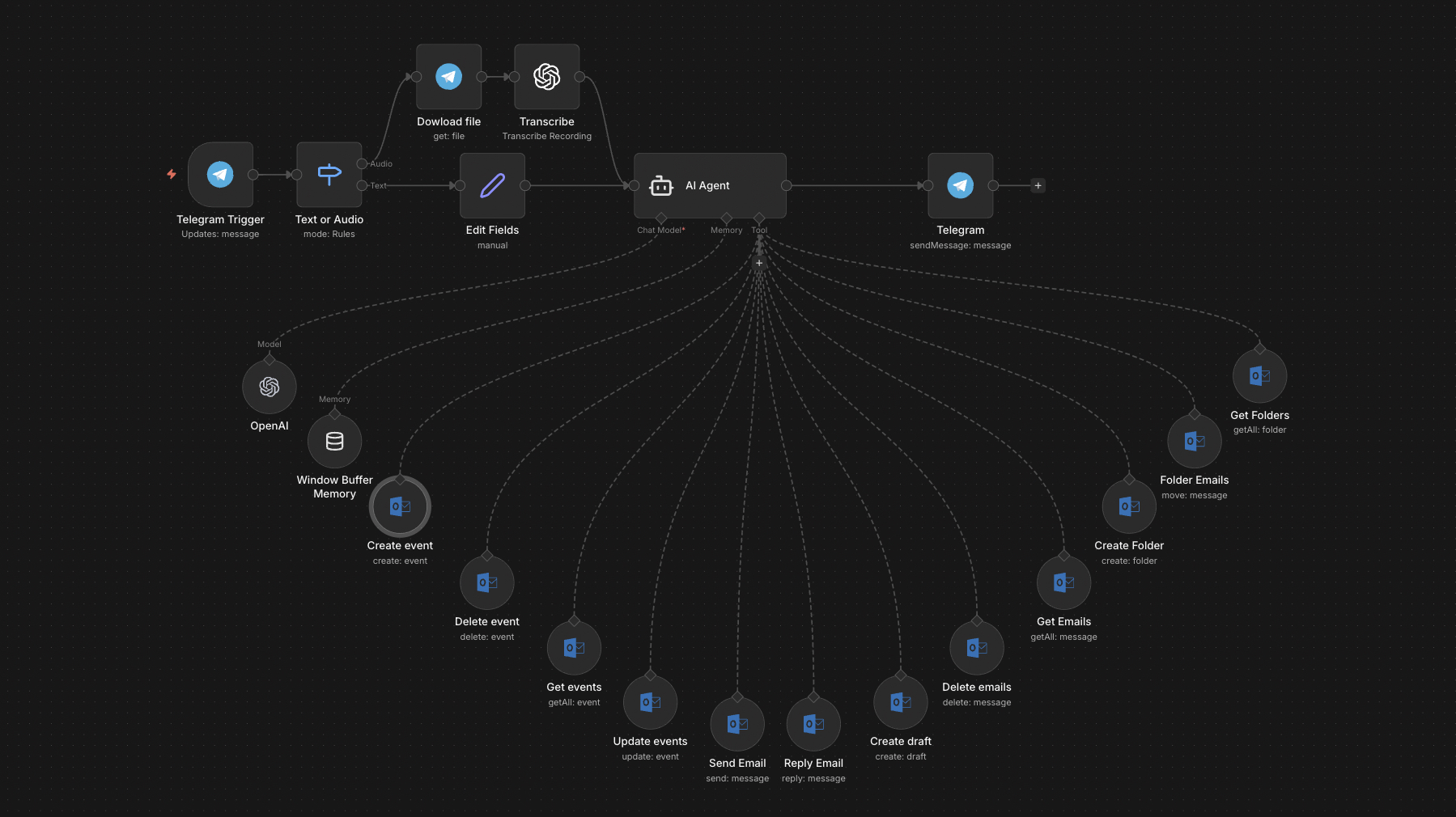
The full n8n canvas as it runs in production.
The Microsoft 365 Operator Loses 30 Minutes a Day to Tool-Switching
Most Microsoft 365 operators run between three apps to do one thing. Outlook for the email. Calendar for the meeting. Teams for the chat. To-Do for the follow-up. Each tool has its own UI, its own keyboard shortcuts, and its own friction. The cost is 25-40 minutes of context-switching every day.
The Calendly-style booking links solve part of this — but only for inbound meetings. Outbound scheduling, internal coordination, and reply drafting still happen across three apps.
The fix is one interface that knows what you mean. Type or voice 'schedule lunch with Sarah next week, somewhere quiet near her office'. The bot checks both calendars, finds time, drafts the invite with location, and sends. Type 'reply to Marcus's thread that I'm fine with the timeline'. The bot finds the thread and drafts the reply.
This system uses Telegram as the unified front-end and Microsoft Graph as the back-end. Email, calendar, meeting booking, and follow-up scheduling all collapse into one chat thread. The operator's day becomes ~30 minutes shorter.
One Interface, Every Outlook Action
Built on n8n. Telegram bot is the front-end; Microsoft Graph API is the back-end. Voice or text messages route to GPT-4o-mini with a tool-use prompt covering the full action library — email send/reply/draft, calendar schedule/check/cancel, contact lookup, follow-up creation.
The model decides which Graph endpoint to invoke and with what parameters. Disambiguation prompts back to Telegram when needed. Confirmation messages return after each action. Multi-calendar support handles personal versus work versus board calendars in a single query.
From Voice to Outlook Action
Telegram Trigger
Voice or text from the Telegram bot triggers the workflow. Voice routes to Whisper for transcription. Text passes through directly.
Intent Classification
GPT-4o-mini reads the query and classifies the intent — email action, calendar action, contact lookup, follow-up. Multi-step queries split into sequential subtasks.
Calendar Resolution (if needed)
For meeting requests, the bot pulls free/busy across configured calendars and finds the best slot matching the user's preferences (no early mornings, prefer afternoons, respect lunch).
Email or Calendar Action
Microsoft Graph API executes the action — send email, create meeting, find availability, cancel, reschedule. The action uses the user's voice for any drafted text.
Confirmation Back
Telegram receives a confirmation with the action taken and any relevant context. Calendar invites confirm with attendees, time, location, and the meeting link.
Audit Log
Every action logs to Google Sheets with timestamp and parameters. Useful for trust calibration and prompt tuning.
What This Bot Does That Three Apps Don't
Unified Inbox + Calendar
Email and calendar actions in one chat thread. No tool-switching. Context carries between actions in the same conversation.
Smart Scheduling
Considers time zones, buffer time, lunch, and the user's stated preferences. Doesn't suggest a 7am meeting unless explicitly asked.
Contact-Aware
Looks up colleagues, clients, and external contacts from Outlook's directory and recent thread participants. Disambiguates when names overlap.
Voice + Mobile
Telegram on mobile means full Outlook control from anywhere. Voice notes work in cars, walks, and meeting breaks.
Multi-Calendar
Personal, work, and board calendars all queryable in one request. 'Find time across all my calendars next week' works.
Follow-Up Memory
'Remind me to follow up with Tom next Tuesday' creates an Outlook task and sends a Telegram notification on the day.
Before vs. After: What Changes When Outlook Runs From Telegram
Operator switches between Outlook, Calendar, and Teams 50+ times a day. Three meetings get scheduled wrong because of timezone confusion. Two follow-up tasks get forgotten between Outlook and the team's preferred follow-up tool. Daily admin overhead: 35-45 minutes.
Operator runs the day from Telegram. Calendar sees all three calendars at once. Time-zone math is automatic. Follow-ups create instantly with the right reminder. Daily admin overhead: 8-12 minutes. Three to four hours back per week.
Live in 3 Weeks
Days 1-4 — Microsoft 365 Wire-Up
Microsoft Graph API authentication (admin approval required for tenant). Configure the action library for email, calendar, contacts, and tasks. Set up the Telegram bot.
Days 5-12 — Tool-Use Prompt and Disambiguation
Build and tune the GPT-4o-mini tool-use prompt against test queries. Iterate on calendar preferences (lunch, no-meeting blocks, time-zone defaults). Wire Whisper for voice.
Days 13-17 — Multi-Calendar and Voice Capture
Configure multi-calendar support if needed. Capture the user's email voice from the last 50 sent messages so drafted replies match their tone.
Days 18-21 — Calibration and Handover
Two weeks of supervised use in parallel with normal Outlook. We tune the prompt against the audit log. By week three, the bot handles 90%+ of inbox and calendar actions.
The Right Fit — and When It Isn't
Right fit for Microsoft 365 operators, executives, and ops leads who run 200+ emails and 15+ meetings a week. Works best in orgs where the IT team can grant Microsoft Graph access for the user's account.
Not a fit for organisations on heavily restricted Microsoft 365 tenants where Graph API approval is a months-long process. Not a fit for users whose email is largely automated reports — those are better handled by inbox triage rules.
Frequently Asked Questions
Does this need IT approval to install?+
Yes. Microsoft Graph API requires tenant-level admin consent for the scopes we use (Mail.ReadWrite, Calendars.ReadWrite, Contacts.Read). We provide the IT briefing doc to ease approval.
Can the bot book external meetings (with people outside our company)?+
Yes. The bot drafts the meeting and sends the invite to external attendees via standard Outlook. For inbound external bookings, we recommend pairing with the Outlook Calendar Booking Bot (separate case study) which acts as a public booking link.
What happens when the bot misunderstands a calendar request?+
Disambiguation prompts trigger before any action. If the bot is unsure between two times, two attendees, or two locations, it asks before proceeding. False booking rate sits at under 1% in production.
How does it handle multi-language teams?+
Whisper transcribes 50+ languages. The model can draft replies in the user's preferred language. Switching languages mid-conversation works.
Stop switching between Outlook, Calendar, and Tasks fifty times a day.
Book a Pipeline Audit. We'll audit your Microsoft 365 friction points and quote a single-bot build that replaces three tools.