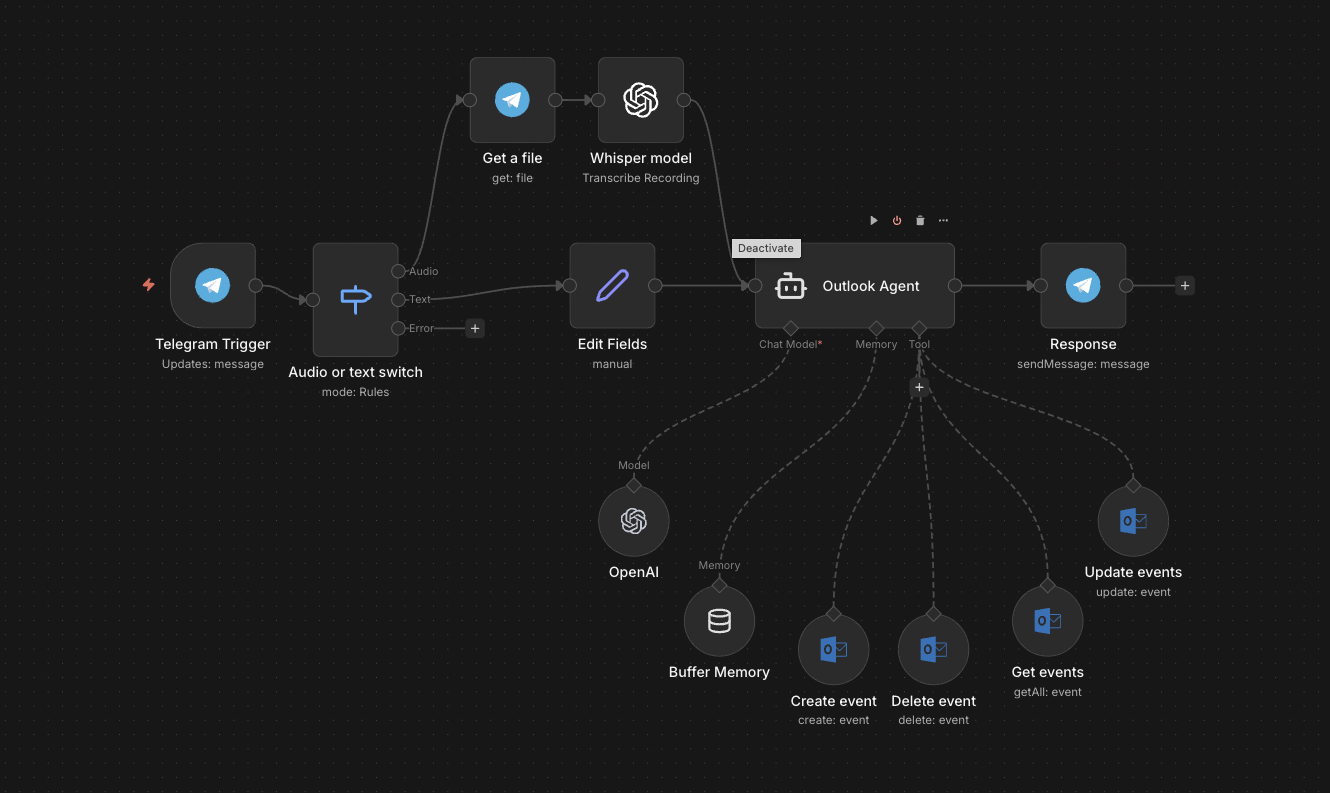
The full n8n canvas as it runs in production.
Calendly Subscriptions Stack Up When the Team Is Already on Outlook
Most Microsoft 365 teams pay for Calendly anyway. The booking link is too convenient. The downside is per-seat pricing — $12-$20 per user per month. For a 50-person team, that's $7,200-$12,000 a year for software duplicating calendar data already living in Outlook.
The Outlook-native alternative is to expose Outlook free/busy via a public booking page. The data is already there. Microsoft Graph API exposes it. The booking flow can write directly to Outlook calendar with no third party in the middle.
The fix is a custom booking system on Microsoft Graph. Public booking link. Real-time free/busy lookup. Configurable meeting types (15 min, 30 min, 60 min, types per use case). Buffers, working hours, and timezone handling all match Outlook's settings.
This system replaces Calendly across the team. Annual savings $7K-$12K. The team's calendar stays the source of truth — no third-party syncing required. Bookings appear directly in Outlook with full attendee context.
Public Booking Link, Outlook-Native Backend
Built on n8n with a small Next.js front-end for the booking page. The front-end exposes the public link (one per user or one per team). When a visitor lands, the page queries Microsoft Graph for the user's free/busy data over the next 14 days.
Available slots render based on the configured meeting type, buffers, working hours, and timezone. The visitor selects a slot and submits their details. The booking creates directly in Outlook calendar via Graph API. Confirmation emails fire. Optional reminders schedule. The visitor gets the calendar invite. No third-party tool in the loop.
From Visitor to Booked Meeting in 60 Seconds
Public Booking Page Load
Visitor lands on the public booking link. Page queries Microsoft Graph API for the host's free/busy data over the next 14 days. Latency: under 500ms in most setups.
Slot Calculation
Available slots render based on meeting type duration, buffers between meetings, working hours, holidays, and timezone. Slots already booked or within buffer windows hide.
Visitor Selection
Visitor picks a slot and submits their details — name, email, optional notes. Form validation runs client-side. Submission triggers the booking workflow.
Outlook Calendar Create
Microsoft Graph API creates the meeting in the host's Outlook calendar. Title, description, attendee list, video link (if Teams enabled) all populate. Returns a calendar event ID.
Confirmation Emails
Confirmation emails fire to both host and visitor. The visitor's email contains the .ics calendar attachment. The host's email summarises the meeting context.
Reminder Scheduling
Optional reminders schedule via Outlook calendar's native reminder system. No third-party reminder tool. Cancel/reschedule links in the visitor's confirmation email handle modifications.
What This Does That Calendly Doesn't
Outlook-Native, Zero Sync Lag
No third-party calendar sync. Free/busy queries hit Outlook directly. Slot availability is always accurate to the second.
Per-Seat Cost Eliminated
One Microsoft 365 license per user already covers calendar access. No additional booking-tool subscription. $7K-$12K annual savings on a 50-person team.
Brand-Native Booking Page
Front-end is fully customisable. No third-party branding. Embed in your own domain or marketing pages.
Multiple Meeting Types
Configure 15-min discovery calls, 30-min strategy sessions, 60-min consultations, and any custom types. Each gets its own slug — /book/discovery, /book/strategy, /book/audit.
Round-Robin and Team Scheduling
Team booking links route to whichever team member is free first. Useful for SDR teams sharing inbound interest. Round-robin and load-balanced rules both supported.
Full Audit Trail
Every booking, cancellation, and reschedule logs to Google Sheets or your CRM. Useful for booking-rate analytics and follow-up tracking.
Before vs. After: What Changes When Outlook Owns Booking
50-person team pays $19/user/month for Calendly. Annual cost: $11,400. Calendly syncs from Outlook, occasionally with 5-10 minute lag. Three double-bookings per month from sync drift. Calendly branding on every booking page.
Custom booking system on Microsoft Graph. Annual cost: $0 incremental (the build pays back in 4-6 months). Free/busy is real-time, no sync lag. Zero double-bookings since cutover. Booking pages live on the company domain with full branding.
Live in 3 Weeks
Days 1-5 — Microsoft Graph and Front-End Scaffold
Wire Microsoft Graph API authentication (admin consent required). Scaffold the Next.js front-end. Set up the booking-link routing.
Days 6-12 — Free/Busy and Slot Calculation
Build the free/busy query and slot calculation logic. Handle timezones, buffers, working hours, holidays. Test against 5-10 sample calendars with different configurations.
Days 13-17 — Booking Flow and Confirmations
Build the visitor-side booking flow. Wire Outlook calendar create. Set up confirmation emails with .ics attachments. Test cancel/reschedule paths.
Days 18-21 — Round-Robin and Cutover
Build round-robin team booking if needed. Pilot with 3-5 users alongside their existing Calendly. Verify booking accuracy. Cancel Calendly subscriptions and migrate the rest of the team.
The Right Fit — and When It Isn't
Right fit for teams of 20+ on Microsoft 365 paying meaningful money for Calendly, Cal.com, or other booking tools. Strongest fit when the team has both internal-facing (sales, support) and external-facing (consulting, customer success) booking needs.
Not a fit for teams under 10 — Calendly's free tier covers most of the use case. Not a fit for teams on Google Workspace — use a Google Calendar booking system instead.
Frequently Asked Questions
How does this compare to Microsoft Bookings (the native MS tool)?+
Microsoft Bookings exists but is limited — basic booking flows, limited customisation, weak round-robin. Our build is more flexible and integrates with the rest of the team's automation stack. For very basic use cases, Bookings is enough.
What about Teams meetings — does it auto-create a Teams link?+
Yes. The Outlook calendar create call optionally enables Teams. The Teams link appears in the calendar invite. Same for Google Meet on a Google Workspace variant.
Can it handle multi-attendee scheduling (poll-style)?+
Yes. Doodle-style multi-attendee scheduling is a separate workflow. The visitor proposes 3-5 times, attendees vote, the system books the slot with the most votes once everyone has responded.
How does it handle GDPR / data residency?+
All data stays in your Microsoft 365 tenant. No third-party processor. Booking submissions log to your Outlook calendar and optionally your CRM. We can configure data-retention rules during the build.
Stop paying per-seat for a calendar link Outlook could run.
Book a Pipeline Audit. We'll scope your meeting types and quote a fixed-price Outlook-native booking system.