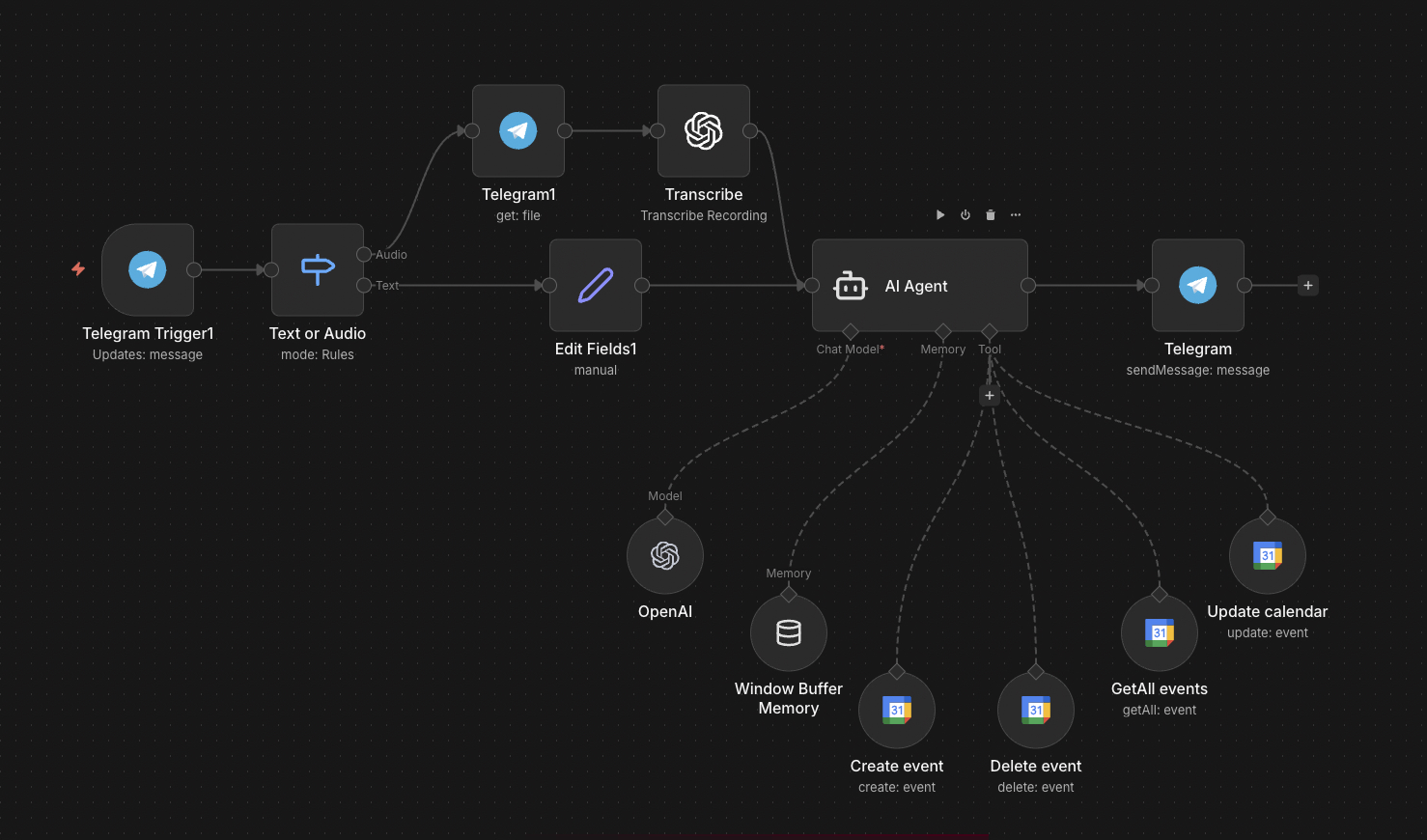
The full n8n canvas as it runs in production.
Most Executives Run Three Calendars and Lose to All Three
Anyone with a real life runs more than one calendar. Personal Google Calendar for the family. Work Outlook for the day job. A board calendar for fiduciary roles. A third email for a side project. Each tool wants to be the source of truth. None of them are.
Manual reconciliation breaks in two ways. First, double-booking — the personal calendar shows free at 14:00, but the work calendar has a hidden meeting that didn't sync. Second, decision paralysis — finding a free hour across three calendars takes 15 minutes of switching. By the time the slot is found, the urgency has passed.
The fix is unification at the query layer, not at the storage layer. Calendar storage stays where it is — Google for personal, Outlook for work. The query layer reads all three through their respective APIs and surfaces a single view. Telegram or WhatsApp interface; voice or text input.
Result: 'find me 30 minutes next Tuesday' returns a real answer in three seconds, accounting for every calendar at once. 'Book lunch with Sarah, somewhere quiet' creates the meeting in the right calendar with the right attendees. Five hours a week of administrative friction disappears.
Three Calendars, One Interface
Built on n8n. The interface is Telegram (or WhatsApp) — voice or text. Queries route to GPT-4o-mini with a tool-use prompt covering the full action library across three calendar APIs — Google Calendar, Microsoft Graph (Outlook), and EventKit-via-CalDAV (Apple Calendar).
Free/busy queries fan out to all three APIs in parallel. Results merge into a unified view. Booking decisions route to the right calendar based on configurable rules (work meetings → Outlook; personal → Google; board → board calendar). Cross-calendar conflicts flag automatically. Round-trip latency for a typical query: under 5 seconds.
From Query to Cross-Calendar Action
Voice or Text Query
User sends a query via Telegram or WhatsApp. Voice notes transcribe via Whisper. Examples: 'find me an hour Thursday', 'book dinner with Tom Friday 7pm somewhere quiet', 'reschedule the 14:00 to 16:00'.
Intent Parsing
GPT-4o-mini parses intent — find availability, create meeting, reschedule, cancel, lookup. Disambiguation prompts back if the request is unclear (which 'Tom', what duration, which calendar).
Cross-Calendar Free/Busy
Free/busy queries fan out to Google, Outlook, and Apple in parallel. Results merge into a unified availability view. Buffers, working hours, and timezone preferences apply.
Calendar Selection (for Bookings)
For booking actions, the routing rule decides which calendar gets the event. Work meetings → Outlook. Personal → Google. Board → board. Custom rules per attendee or topic supported.
API Action
The right calendar API executes the create/update/cancel. Confirmation event ID returns. Cross-calendar conflicts (booking on Google when Outlook has a hidden meeting at the same time) catch and prompt before write.
Confirmation Back
User receives confirmation via Telegram with full meeting details — title, time, attendees, calendar where it was created. Complex multi-calendar moves (rescheduling that affects two calendars) confirm step by step.
What This Agent Does That Manual Calendar Reconciliation Doesn't
Unified Free/Busy View
One query returns availability across every calendar. No tab-switching. No 'let me check my other calendar' moments.
Smart Calendar Routing
Configurable rules decide which calendar a new meeting books into. Work meetings to Outlook, personal to Google, board to board — all automatic.
Conflict Detection
Cross-calendar conflicts catch before booking. Outlook hidden meeting at 14:00 prevents a Google booking at the same time. No more double-bookings.
Voice Anywhere
Telegram and WhatsApp work on every device. Voice notes transcribe via Whisper. Useful in cars, walks, meeting breaks.
Meeting Memory
Re-mention a previous attendee or topic and the agent recalls context. 'Same as last time' for repeat meetings works without re-specifying details.
Handover-Friendly
Audit log of every action. EAs can step in mid-conversation and continue. Useful for executives who delegate calendar management partially.
Before vs. After: What Changes When Calendars Unify
Executive switches between Google, Outlook, and the board calendar 30+ times a day. Three double-bookings per quarter. 5-7 hours a week on calendar admin. Mental overhead of 'wait, which calendar is this in' constantly.
All actions flow through Telegram. Voice while walking, typing while in meetings. 5 hours a week back. Zero double-bookings since cutover. The mental overhead disappears — the agent just knows where things go.
Live in 5 Weeks
Week 1 — API Auth Across Three Calendars
Wire Google Calendar OAuth, Microsoft Graph admin consent, and Apple Calendar via CalDAV (or Apple's CalKit if iOS-native). Verify free/busy queries against test calendars.
Week 2 — Unified Free/Busy Layer
Build the parallel query layer. Implement timezone handling, buffer rules, working hours. Test against the user's real calendar configuration.
Week 3 — Booking Routing and Conflict Detection
Build the calendar selection logic. Implement cross-calendar conflict detection. Tune routing rules per the user's preferences.
Week 4 — Voice and Telegram Interface
Wire Whisper voice transcription. Build the Telegram bot front-end. Implement disambiguation prompts and meeting memory.
Week 5 — Calibration and Cutover
Two-week pilot in parallel with manual calendar use. Audit log catches any wrong actions. Tune the prompt and routing rules. Cutover to primary use.
The Right Fit — and When It Isn't
Right fit for executives, founders, and operators running 2+ active calendars across different ecosystems (Google + Microsoft + Apple). Strongest fit when the user is comfortable with voice interfaces and willing to verify outputs in the first weeks.
Not a fit for users with one calendar and an EA who manages it — the EA can do this manually. Not a fit for highly delegated calendars where the executive doesn't directly book anything; the EA is the right operator for that workflow.
Frequently Asked Questions
What if my Apple Calendar is iCloud-only?+
iCloud calendars sync via CalDAV protocol. We wire that as a third source. iOS-native CalKit isn't accessible from a workflow agent, but CalDAV gives the same data with a 30-second lag at most.
Can this work with shared family calendars?+
Yes. Shared calendars (family, team, public) are read-write through the same APIs. The agent treats them as additional calendars in the routing rules.
How does it handle delegated access (EA support)?+
EAs can be added as a second user on the agent. They see the same calendar view and book on the executive's behalf. Audit log distinguishes EA actions from executive actions.
What happens when one calendar API is down?+
Free/busy queries continue against the other two with a clear flag that one calendar is unavailable. The agent doesn't book during the outage to prevent double-booking risk.
Stop switching between three calendars to find one free hour.
Book a Pipeline Audit. We'll inventory your calendars, design the unification logic, and quote a fixed-price multi-calendar agent.