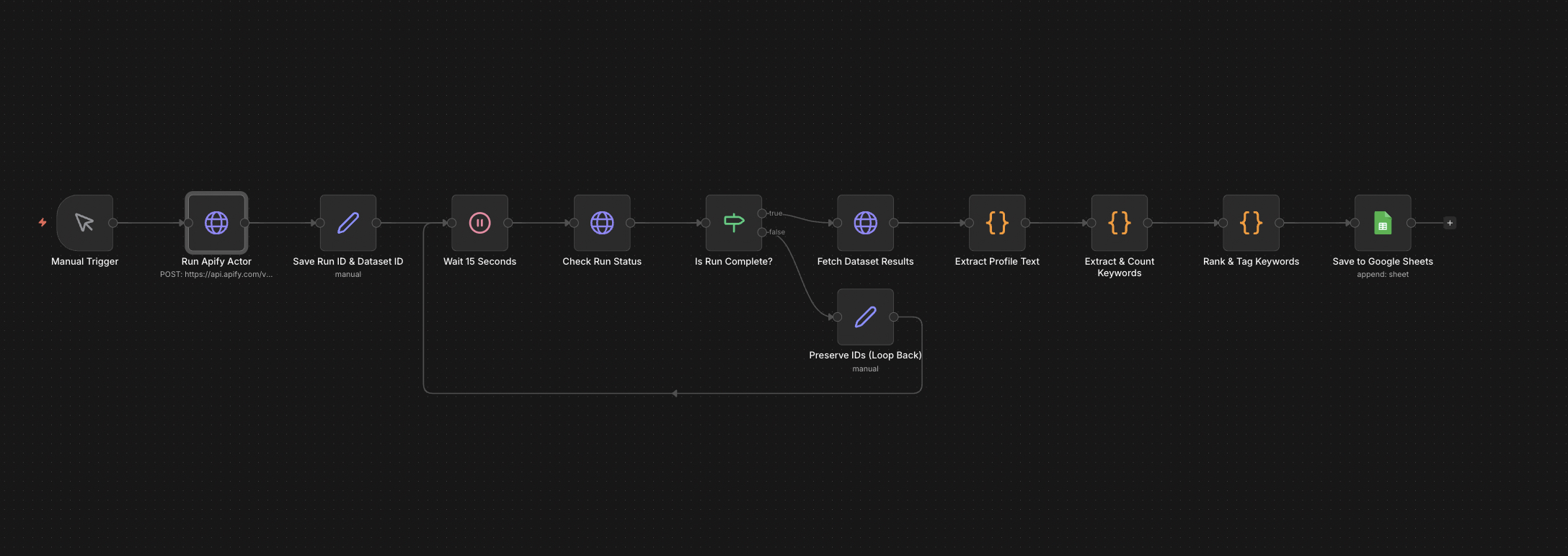
The full n8n canvas as it runs in production.
Most Upwork Freelancers Optimise Their Profile by Guess
Upwork's invite algorithm and search results are keyword-driven. The freelancer's profile title and overview need to contain the right keywords, weighted in the right order, with the right density. Most freelancers write what sounds good and hope.
The freelancers ranking in the top 5 search results know what keywords work — because they've been there for years and pay attention. The next 50 freelancers are competing for the same searches without that data.
The fix is to copy the data the top 50 already have. Scrape their profiles. Scrape the live job postings clients are submitting. Cross-reference. Find the keywords that have high demand from clients and high frequency in winning profiles. Those are the keywords to use.
This tool runs that analysis. The output is a ranked keyword list with demand score, competition score, and a recommendation for which keywords to feature in the profile title vs. the overview. Profile visibility climbs 3× within four weeks of changes.
Scrape the Winners, Read the Demand
Built on n8n. The user provides a niche query (e.g. 'AWS DevOps engineer'). Apify runs two scrapes in parallel — top 50 freelancer profiles in the niche, top 200 active job postings. Each profile and job extracts to structured JSON.
Keyword extraction runs across all profile and job text. Each keyword gets two scores — demand (frequency in client job posts) and competition (frequency in top freelancer profiles). The output ranks keywords by demand-divided-by-competition. High demand + low competition = the keywords to feature. Output exports to Google Sheets with rank, demand, competition, and a placement recommendation per keyword.
From Niche Query to Ranked Keyword List
Niche Query Input
User submits a niche query — role plus skill set. Examples: 'AWS DevOps engineer', 'Shopify developer', 'B2B copywriter'. Trigger fires the parallel scrapes.
Top Profile Scrape
Apify scrapes the top 50 freelancer profiles ranking for the query. Returns title, overview, skills, hourly rate, and earnings tier per profile. Total run time: 5-8 minutes.
Active Job Scrape
Apify scrapes the top 200 active job postings matching the query. Returns job title, description, required skills, budget range, and proposal count per job. Total run time: 4-6 minutes.
Keyword Extraction
Text from all profiles and jobs runs through a keyword extraction layer. Single keywords and 2-3 word phrases extract. Stop words filter. Skills tags get explicit weight.
Demand/Competition Scoring
Each keyword gets a demand score (frequency across job posts) and a competition score (frequency across top profiles). Ranking metric is demand divided by competition.
Sheets Export with Recommendations
Output exports to Google Sheets with rank, demand score, competition score, and placement recommendation (title / overview / skills tag / skip). User updates their profile from the recommendations.
What This Tool Does That Manual Profile Tuning Doesn't
Data-Driven Keywords
Every recommendation backs to actual job-post and competing-profile frequency. No guessing what clients search for.
Demand-vs-Competition Ranking
Identifies keywords with strong client demand and weak competing-profile saturation. The freelancer targets the gaps, not the most-saturated terms.
Placement Recommendations
Each keyword's recommendation specifies where to place it — profile title (most weight), overview body, skills tags, or skip. Prevents over-stuffing.
Re-Run Anytime
Niches shift. Run the analysis quarterly to catch new keywords gaining demand. The freelancer's profile evolves with the market.
Multi-Niche Support
Run separate analyses for each niche the freelancer works in. Compare overlap between niches to find positioning that captures both.
Hourly Rate Calibration
Top-50 scrape includes hourly rates. Useful for freelancers anchoring their own rate against winning competitors. Most freelancers underprice by 20-40%.
Before vs. After: What Changes When Keywords Get Targeted
Freelancer's profile reads well but ranks on page 4 for the niche. Two job invites a week. Most invites are wrong-fit projects because the keyword targeting is off. Hourly rate guess: $40, but top-50 average is $85 — leaves money on the table for years.
Profile title rewrites with the top three demand-vs-competition keywords. Overview rewrites with the next ten. Skills tags update. Within four weeks, profile visibility triples. Invites jump from 2/week to 11/week. Hourly rate climbs to $75 with no change in close rate.
Live in 1 Week
Days 1-2 — Niche Definition and Apify Setup
Confirm the niche query (or queries if multi-niche). Wire Apify credentials. Verify scrape output quality on a test niche.
Days 3-4 — Extraction and Scoring
Build the keyword extraction layer. Implement demand/competition scoring. Generate placement recommendations from the rank.
Days 5-6 — Sheets Export and UI
Build the Google Sheets export. Add the placement recommendation column. Build a simple Telegram or web trigger so the user can re-run any time.
Day 7 — Calibration and Handover
Run the full analysis on the user's niche. Walk through the recommendations together. Document the re-run process for ongoing use.
The Right Fit — and When It Isn't
Right fit for established freelancers on Upwork, Toptal, or similar platforms with keyword-driven search algorithms. Works best when the freelancer has a clear niche to target.
Not a fit for brand-new freelancers without an established profile — keyword optimisation matters less than getting the first reviews. Not a fit for freelancers in tiny niches where 50 top profiles don't exist.
Frequently Asked Questions
Will this work on Fiverr or other platforms?+
The architecture is the same. Fiverr, Toptal, PeoplePerHour, and Freelancer.com all swap in by changing the Apify actor. Upwork is the default because it has the largest dataset.
How often should I re-run the analysis?+
Once per quarter is typical. Niches shift slowly. Re-running monthly is overkill for most freelancers; re-running yearly misses keyword shifts.
What if my niche has fewer than 50 top profiles?+
The scoring still works on smaller datasets but recommendations get noisier. We tune the demand/competition formula based on dataset size. Niches with under 20 active job posts are too small for meaningful analysis.
What's the cost per run?+
Under $10 in Apify scraping fees per niche analysis. The build cost is one-time. Most freelancers run the analysis quarterly per niche they work in.
Stop guessing which keywords get you invited to jobs.
Book a Pipeline Audit. We'll set up your niche analysis and ship a tool you can re-run any time you want to refresh your profile.