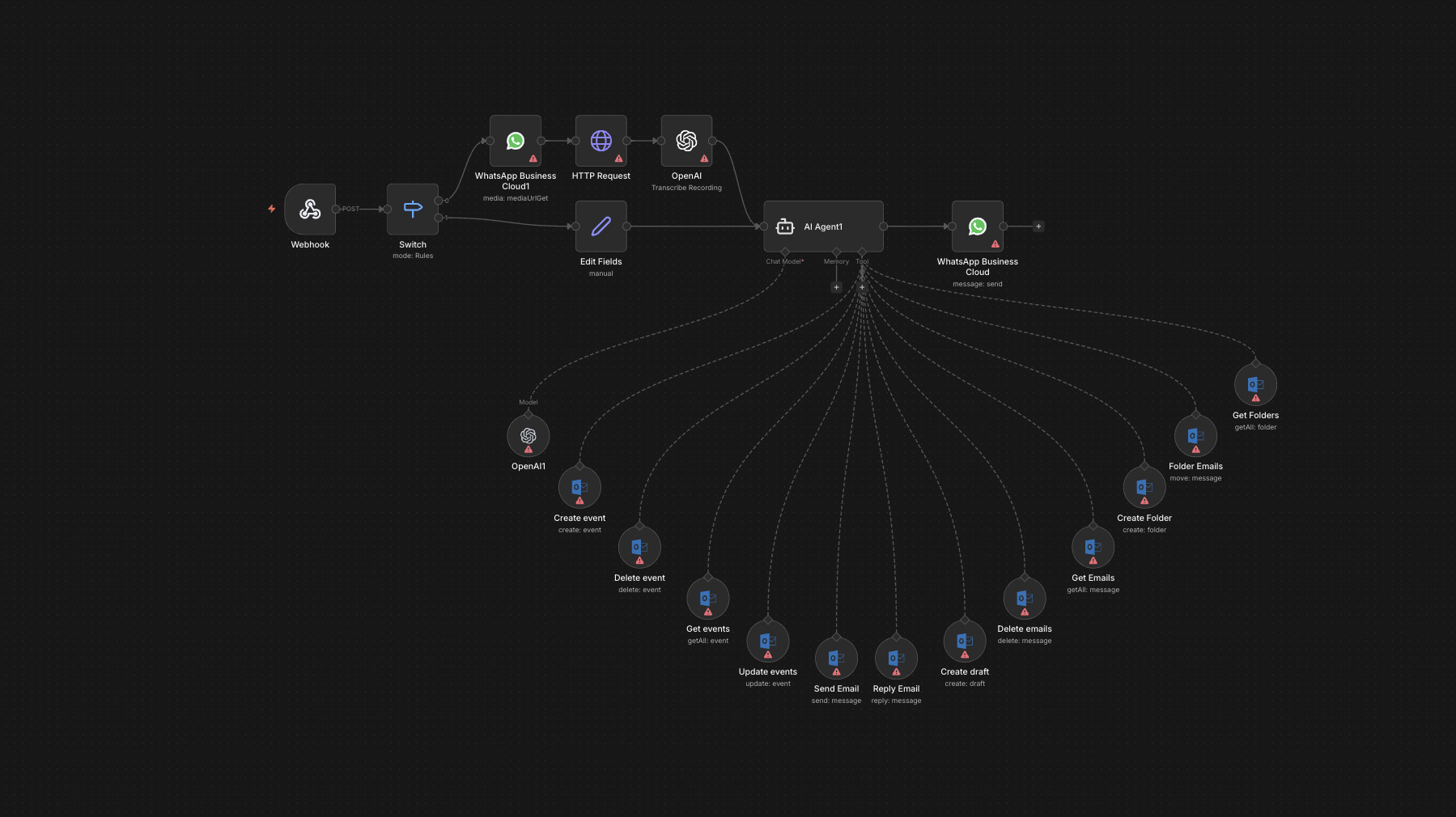
The full n8n canvas as it runs in production.
Field Teams and Head Office Live in Different Apps
Most distributed B2B businesses split into two camps. Head office lives in Outlook — formal, threaded, archived. Field teams live in WhatsApp — fast, mobile, voice-first. Neither will switch. Both sides waste time translating across channels.
The classic failure pattern: field tech sends a job update on WhatsApp at 16:30. Head office sees it on Tuesday morning when someone scrolls back. By then the customer has already complained to a different channel and three follow-ups are out of date.
The reverse fails too. Operations sends an Outlook email about a job change. Field tech doesn't open Outlook for two days. The job runs against the old spec. Customer is unhappy. Head office blames field. Field blames head office. Real cause: tool friction.
The fix is not 'make everyone use one tool'. It's making both tools talk. Outlook emails surface as WhatsApp messages with reply-back routing. WhatsApp threads flow into Outlook with sender attribution. Urgency rules route the right messages to the right channel automatically. Both sides stay in their preferred tool. Information stops getting lost in the gap.
Bidirectional Bridge with Thread Continuity
Built on n8n. Two ingestion legs feed one routing layer — Microsoft Graph webhook for new Outlook emails, WhatsApp Business API webhook for new WhatsApp messages. Each new item passes a routing rule based on sender, content keywords, and configured urgency criteria.
Routing decides three things — does this need to bridge to the other channel, who is the recipient, and is this urgent. Bridged messages preserve thread context (subject lines on the WhatsApp side, sender names on the Outlook side). Urgent messages flag with priority indicators in both channels. Reply-back routing means a WhatsApp reply to a bridged email surfaces back in the Outlook thread automatically.
From One Channel to Both: Six Steps
Channel Webhooks Listen
Microsoft Graph webhook fires on new Outlook emails matching configured filters (specific senders, subject patterns, recipient groups). WhatsApp Business API webhook fires on new messages to configured numbers.
Sender and Content Classification
GPT-4o-mini classifies the message — is it informational, requires action, urgent, FYI? Sender is matched against the team directory to determine which channel they belong to and where the message should route.
Routing Decision
Configured rules decide whether to bridge. Internal-only emails to head office stay in Outlook. Field-relevant emails bridge to WhatsApp. Urgent threads bridge in both directions automatically.
Bridge with Context
Bridged Outlook emails arrive on WhatsApp with the subject, sender name, and body — formatted for mobile reading. Bridged WhatsApp messages arrive in Outlook as a thread with sender attribution and original timestamp.
Reply-Back Routing
A reply on either side routes back to the original thread. WhatsApp reply to a bridged email surfaces in the Outlook thread. Outlook reply to a bridged WhatsApp thread sends as a WhatsApp message back.
Audit Log
Every bridged message logs to Google Sheets — who, what, when, urgency, response time. Useful for compliance audits and tuning urgency rules.
What This Bridge Does That Manual Forwarding Doesn't
Full Thread Continuity
Reply on either side stays in the original thread. Email subject lines preserve. WhatsApp thread context preserves. No 'where did that conversation happen' moments.
Urgency-Aware Routing
Configurable urgency rules route urgent threads to both channels at once. Non-urgent threads stay in their origin channel to avoid noise.
Sender Attribution
Bridged WhatsApp messages arrive in Outlook with the WhatsApp sender's name and number visible. Vice versa for Outlook → WhatsApp. No anonymous ghost messages.
Selective Bridging
Internal-only Outlook traffic stays in Outlook. Operational WhatsApp banter stays in WhatsApp. Only relevant messages cross the bridge — preventing noise.
Full Audit Trail
Every bridged message logs with sender, recipient, timestamp, and urgency flag. Useful for compliance audits and post-incident reviews.
Voice Note Support
WhatsApp voice notes transcribe via Whisper before bridging to Outlook. Email recipients see the transcript with the audio attached.
Before vs. After: What Changes When Both Channels Talk
Field tech sends a job photo on WhatsApp at 16:30 Friday. Head office doesn't see it until Tuesday morning. By then the customer has emailed Outlook complaining. Two threads exist for one issue. Resolution takes three days.
Field tech sends the same photo. The bridge surfaces it in Outlook within 60 seconds with sender attribution and timestamp. Head office sees the urgency tag, replies in Outlook. The reply lands in field tech's WhatsApp inside a minute. Issue resolves before the customer complains.
Live in 4 Weeks
Days 1-5 — Channel Provisioning
Microsoft Graph webhook setup (admin consent required). WhatsApp Business API number provisioning. Build the team directory mapping who lives in which channel.
Days 6-14 — Routing Rules and Classification
Build the GPT-4o-mini classification prompt for urgency and routing. Define configurable rules per team and per message type. Test against historical message logs from both channels.
Days 15-21 — Reply-Back and Thread Continuity
Build reply-back routing. Test thread continuity in both directions. Handle edge cases — replies to forwarded threads, reply-all behaviour, voice notes.
Days 22-28 — Pilot and Cutover
Two-week pilot with one team pair. Audit log highlights routing errors. Tune urgency rules. Roll out to remaining teams in week four.
The Right Fit — and When It Isn't
Right fit for distributed B2B businesses where head office runs Outlook and field/sales/customer-facing teams run WhatsApp. Property, construction, manufacturing, field services, and trading desks with travelling traders are the strongest fits.
Not a fit for fully co-located teams on a single channel — at that point WhatsApp Business or Outlook alone is enough. Not a fit for organisations with strict compliance requirements that prohibit WhatsApp business communication (some financial services and healthcare contexts).
Frequently Asked Questions
Is this compliant with WhatsApp Business policy?+
Yes for opt-in B2B internal communication. We use the official WhatsApp Business Cloud API. For external customer-facing messaging there are additional consent requirements we wire in during setup.
What happens if WhatsApp messages contain sensitive data?+
Configurable redaction rules can block specific patterns (credit card numbers, NHS numbers, etc.) from bridging. Redacted messages still log internally for audit.
Can it work with Slack or Teams instead of WhatsApp?+
Yes. Slack and Teams variants exist. The architecture is the same — only the API changes. We've shipped Slack ↔ Outlook bridges for fully internal team setups.
How does urgency get classified?+
Combination of keyword matching, sender role, and AI classification. Rules are configurable. Most clients tune the rubric over the first month based on what actually felt urgent in retrospect.
Stop losing field-team queries because half the team lives on WhatsApp.
Book a Pipeline Audit. We'll map your channel split, design the bridge, and quote a fixed-price build that keeps both teams in their preferred tool.